Root Instances
Object instances can be stored as simple records. One value after another as a trivial byte stream. References between objects are mapped with unique numbers, called ObjectId, or short OID. With both combined, byte streams and OIDs, an object graph can be stored in a simple and quick way, as well as loaded, as a whole or partially.

But there is a small catch. Where does it start? What is the first instance or reference at startup? Strictly speaking "nothing". That’s why at least one instance or a reference to an instance must be registered in a special way, so that the application has a starting point from where the object graph can be loaded. This is a "Root Instance".
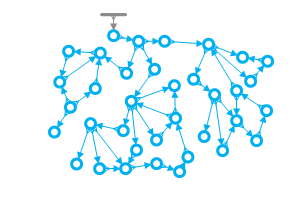
Same difference, another problem are instances which are references by constant fields in Java classes. These aren’t created when the records are loaded from the database, but by the JVM while loading the classes. Without special treatment, this would be a problem:
-
The application, meaning the JVM or the JVM process, starts, the constant instances are created by the JVM, one or more of them are stored, then the application shuts down.
-
The stored data of the constants are now stored with a certain OID in the database.
-
The application starts again.
-
The Constant instances are created again by the JVM. The data records are read by EclipseStore.
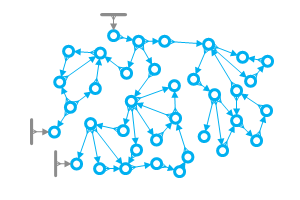
The problem is: How should the application know what values, which are stored with a certain OID, belong to which constant? The JVM created everything from scratch at startup and doesn’t know anything about OIDs. To resolve this, the constant instances must be registered, just like the entity graph’s root instance. Then EclipseStore can associate the constant instances with the stored data via the OIDs. Constant instances can be thought of as JVM-created implicit root instances for the object graph.
In both cases, root and constant instances, it is about registering special starting points for the object graph in order to load it correctly. For EclipseStore, from a plain technical view, both cases don’t make a difference.
What Must Be Done in the Application?
In the most common cases, nothing at all. The default behavior is enough to get things going.
By default, a single instance can be registered as the entity graph’s root, accessible via EmbeddedStorage.root().
Therefore, this is already a fully fledged (although tiny) database application:
// Start the database manager
EmbeddedStorageManager storageManager = EmbeddedStorage.start();

// Set the entity (graph) as root
storageManager.setRoot("Hello World");

// Store root
storageManager.storeRoot();
Shared Mutable Data
If you are working with EclipseStore technology in a multi-threaded environment, there are a few things you need to pay extra attention to.
Synchronize access to shared mutable data
When using standard frameworks, you often work in a multi-threaded environment. If you are using the older JDBC approach, you create a copy of your data that you work with within a single thread, modify the data, and then save it back in a database trace. EclipseStore works with data directly, allowing it to achieve significantly better performance parameters. However, for developers, this means that any reading and writing to this shared object graph must be synchronized.
|
Modifying the object graph and storing the changes must be done under the same lock.
EclipseStore cannot provide this synchronization on the application level — it is the application’s responsibility to ensure that the mutation and the corresponding |
To make it easier to use within your application, we have prepared a simple way for you to do so.
XThreads.executeSynchronized(() -> {
    root.changeData();
    storageManager.store(root);
});
Note that both the modification (changeData()) and the store() call are inside the same synchronized block. This is essential — never modify the object graph outside the lock or defer the store() to a later, unsynchronized point.
This approach will immediately provide you with several benefits:
-
Any changes to your object graph will be synchronized, every other thread will see the current value.
-
Avoid Deadlocks
-
The object graph cannot be modified by another thread while it is being saved.
|
If you want to achieve a better performance, you have to use a more advanced locking. |
Custom Root Instances
The simple default approach has its limits when the application defines an explicit root instance that must be updated/filled from the database directly during database initialization.
Something like this:
// Empty application-specific root, to be filled during start()
MyApplicationRoot root = new MyApplicationRoot();

// Start the database manager
EmbeddedStorageManager storage = EmbeddedStorage.start();

// root must be filled at this point... but how?
root.printAllMyEntities();
To solve this, a custom root instance can be directly registered at the database setup.
In the simplest case, is just has to be passed to .start();:
// Empty application-specific root, to be filled during start()
MyApplicationRoot root = new MyApplicationRoot();

// Start the database manager with a reference to the application's root.
EmbeddedStorageManager storageManager = EmbeddedStorage.start(root);

// root is "magically" filled at this point. (Yay!)
root.printAllMyEntities();
Internally, the two concepts (default root and custom root) and handled by different mechanisms. This can be seen from the two different methods
storageManager.defaultRoot();
storageManager.customRoot();
The simplified method storageManager.root(); automatically chooses the variant that is used.
Both root() and setRoot() use a generic type parameter <R>, so the concrete type is inferred automatically from the usage context.
No cast is required:
MyApplicationRoot root = storageManager.root();Likewise, storageManager.storeRoot(); works for both variants, so there is no need to worry about how to store which one.
Convenient Root Initialization with ensureRoot()
A common pattern when starting a database is to check whether a root object already exists and, if not, create and store a new one:
EmbeddedStorageManager storage = EmbeddedStorage.start();
if (storage.root() == null)
{
    storage.setRoot(new MyApplicationRoot());
    storage.storeRoot();
}
MyApplicationRoot root = storage.root();
The ensureRoot() method simplifies this into a single call:
EmbeddedStorageManager storage = EmbeddedStorage.Foundation()
    .createEmbeddedStorageManager();
MyApplicationRoot root = storage.ensureRoot(MyApplicationRoot::new);
ensureRoot(Supplier<R>) performs the following steps:
-
Starts the storage if it is not yet running.
-
If the root is
null, invokes the supplier to create a new root instance, sets it, and stores it. -
Returns the root object, typed to
R.
The supplier is only invoked if the root is not already set.
|
|